The right access for every person, without managing it one member at a time. Assign roles like Admin, Author, Contributor and Reader, set read, edit or publish access on any subject, document or learning path, and apply it at scale with member groups.

Waybook separates what someone can do from what they can see. Member types set role-level capabilities: Admins manage everything including billing, Authors create new subjects and documents, Contributors edit and create documents within the areas they're given, and Readers simply view. Permissions then control the content itself, with read, edit, publish or no access on every subject, document and learning path.
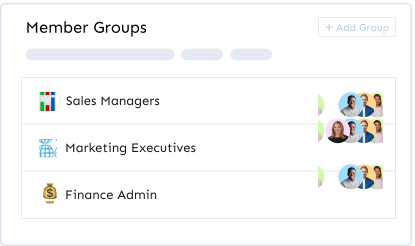
Member groups make this manageable as you grow. Organize people by department, location, seniority or a mix of all three, assign access once at the group level, and every new member added to a group gets exactly the right content immediately. A sales rep might be in Sales Team for read access to playbooks and All Employees for company-wide policies, while a sales manager also sits in Sales Contributors with editing rights. Individual overrides handle the exceptions without unpicking the structure.
Readers only ever see the content they've been given, which keeps dashboards focused and sensitive material private. Groups also drive completion requirements and learning path assignments, so the same structure that controls access also controls who has to complete what. On Pro, the Manager role adds the ability to invite, edit and report on the members of the groups a person manages, and advanced permissions give even finer control.
You have full control over which subjects your teammates can access and set permissions accordingly; these can be no access, read, edit and publish.
You can easily create member groups to ensure your team has the correct level of access and control required with minimum management and maximum confidence.




.png)
.png)