

By Mike Bandar, Co-founder of Waybook.
For a team of 10 to 200 people, Waybook is the internal wiki software to buy when the wiki holds how the company operates, its procedures, policies and onboarding, and people have to read and follow it: pages are assigned by role, tested, and on Pro confirmed by name and date with an owner and a review date, and Waybook Ask answers questions from your own pages. Of the nine tools here, it is the only one whose site lists read confirmation and tests. The price is published, Core from $99 a month billed annually for 20 members and Pro, the best value, at $198, about $9.90 a member, with a 7-day free trial you start yourself.
Notion, Confluence, Slite, Slab and Tettra are good wikis for storing and finding pages, and most are cheap per user. Guru is an enterprise platform sold by quote, and ClickUp attaches docs to a project tool. This guide compares nine internal wiki tools for founders, operations managers and HR leads, with a recommendation for each type of business in the FAQs. If you are replacing a specific tool, see the best Confluence alternatives and the best Notion alternatives.
Published November 4, 2026. Prices captured and dated in the table.
Our top picks for the best internal wiki software (2026)
Waybook: Best internal wiki for teams of 10 to 200 that need procedures read and followed
Notion: Best flexible workspace
Confluence: Best for teams that run Jira
Guru: Best for enterprises that want answers inside Slack and Teams
Slite: Best AI-first wiki for a small team
Slab: Best low-cost wiki with good search
Tettra: Best for Slack-first small teams
ClickUp: Best if docs belong next to your projects
Google Docs or a shared drive: Free storage, not a wiki
What an internal wiki has to do that a shared drive cannot
An internal wiki is one place for how the company works. Most teams start with a shared drive and hit the same wall Prime Property Management's Head of Operations, Molly Davis, described before they moved: "Team members would often accidentally overwrite documents or save files in obscure locations, making it nearly impossible for staff to know which procedure was current." Three things separate a wiki people use from one they ignore.
It answers before someone asks a person. The point, as one operations lead put it, is "so the team stops losing time hunting for the right person to answer every question." Search and AI answers from your own pages turn those interruptions into a link.
One current version, with an owner. Every page needs someone responsible and a date it is next reviewed, so the wiki is trusted. Without that it becomes a museum of old versions.
A record of who read it. For procedures and policies, the wiki has to show that the people they apply to read and understood the current version. That is the question a customer, an auditor or a new manager eventually asks. For the wider category, including customer help centers, see the best knowledge base software.
Nine internal wiki tools at a glance, and our verdict
Tool | Verdict | Pricing |
|---|---|---|
Waybook | Our pick for an internal wiki at teams of 10 to 200: procedures, policies and onboarding in one place, Waybook Ask answering from your pages, tests, and read confirmation by name with owners and review dates on Pro. Price published, trial you start yourself. Not for engineering specs or project boards. | Core $99 a month billed annually for 20 members. Pro, the best value, $198 a month for 20 members, about $9.90 a member. Self-led setup included; Guided Implementation $1,500. 7-day free trial. |
Notion | Flexible workspace for docs, wikis and databases that every team builds differently. Verified pages on Business; viewers list instead of read confirmation; no tests or onboarding paths. | Free plan; Plus $10 and Business $20 per seat a month (captured November 4, 2026). |
Confluence | The wiki for teams already in Jira: pages, spaces, databases and Rovo AI. Built around engineering and project documentation; no read confirmation, tests or onboarding paths listed. | Free for up to 10 users; Standard $5.78 and Premium $11.16 per user a month; Enterprise by sales (captured November 4, 2026). |
Guru | Enterprise knowledge platform that pushes verified answers into Slack, Teams and the browser. Strong governance; priced by quote and built for large organizations. | By quote; no price published (captured November 4, 2026). |
Slite | Clean, AI-first team wiki with answers from your docs. Simple and fast to adopt; AI usage is capped by plan, and there is no read confirmation, tests or onboarding paths. | $10 and $20 per user a month, billed yearly; 14-day trial (captured November 4, 2026). |
Slab | Tidy internal wiki with good search and integrations. Cheap for small teams; every member is a paid user, and there is no read confirmation, tests or onboarding paths. | Free plan; Startup $6.67 and Business $12.50 per user a month, billed annually (captured November 4, 2026). |
Tettra | Simple internal wiki for Slack-first small teams, with answers in Slack. Affordable; 10-user minimum, SSO is an add-on, no tests or onboarding paths. | $8 per user a month with a 10-user minimum; 30-day trial; SSO an add-on (captured November 4, 2026). |
ClickUp | Project management with docs and wikis attached. Good if your team already plans work in it; Doc Wikis are capped at one on the Free, Core and Business plans. | Free plan; Core $9 and Business $17 per user a month, billed yearly (captured November 4, 2026). |
Google Docs or a shared drive | Free, familiar storage. No structure, owners, review dates or record of who read anything. | Included in a Google Workspace subscription. |
The verdict column is written for a founder, operations manager or HR lead at a business of 10 to 200 people. An engineering team documenting code is a different buyer, and Confluence is built for it.
Quick comparison: internal wiki features
Tool | Read confirmation by name | Tests and quizzes | Review dates or verification | Onboarding paths | AI answers from your docs | Published price |
|---|---|---|---|---|---|---|
Waybook | Yes (Pro) | Yes | Yes (Pro) | Yes | Yes, Waybook Ask | Yes |
Notion | Viewer list | No | Verified pages (Business) | No | Notion AI | Yes |
Confluence | No | No | No | No | Rovo | Yes |
Guru | No | No | Verification | No | Yes | No, by quote |
Slite | No | No | No | No | Yes, capped | Yes |
Slab | No | No | No | No | No | Yes |
Tettra | No | No | No | No | In Slack | Yes |
ClickUp | No | No | No | No | No | Yes |
Google Docs or a shared drive | No | No | No | No | No | Included |
Features as each vendor lists them on its own site, captured November 4, 2026. No means the vendor's own site does not list the feature.
The nine internal wiki tools
1. Waybook
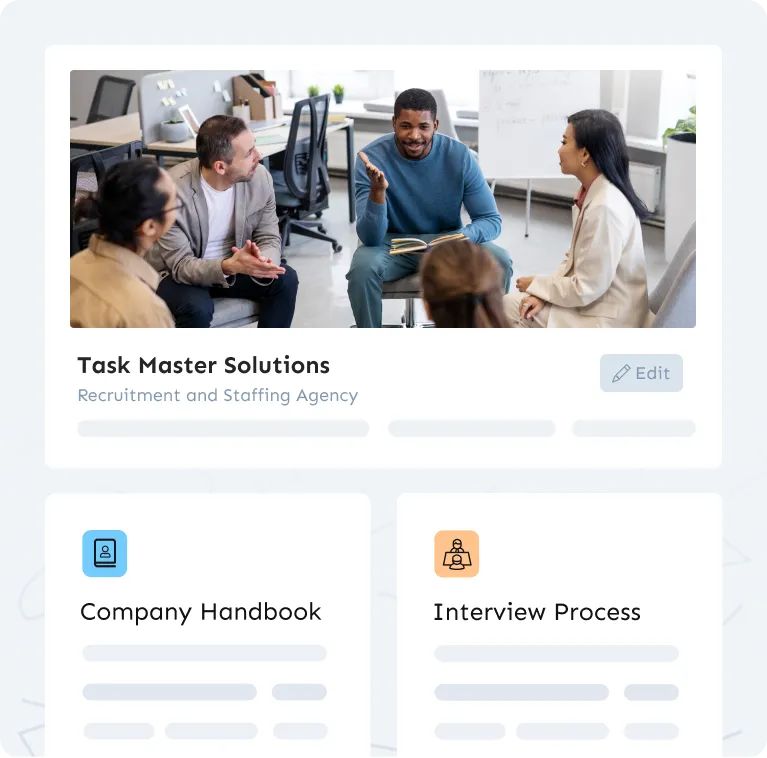
Waybook is a company playbook: your SOPs, policies, handbook and wiki pages, organized into subjects and documents, with the training built in. Where a typical wiki stores pages, Waybook assigns them: each role gets the documents it needs, with due dates, tests and progress tracked per person, and on Pro a knowledge confirmation step that records who read and understood each document, by name and date.
What matters here: Waybook Ask answers questions from your own documents, with search on every plan; the AI writer drafts documents from notes; Waybook Shots captures a process as step-by-step screenshots; learning paths put new hires through the right pages in order; and on Pro, document verification with review dates and owners, the approval process, full version history and the audit log keep the wiki current instead of stale. People read on the iOS and Android apps and get updates in Slack or Microsoft Teams. See knowledge base software. Capterra rates it 4.9 from 56 reviews.
The after-state is what customers describe. Charlotte Sabin, Global Operations Director at Immerse Education: "I would describe Waybook like a map... like the tube map... really clear patterns and ways to navigate it but under there is just so much information." At Prime Property Management, the standard answer to a question is now "have you checked Waybook?"
Why Pro is the best value for a team wiki: it adds knowledge confirmation steps, document verification with review dates, the approval process, full version history, advanced due dates and the audit log to everything in Core, plus advanced permissions with a manager role, SSO and directory sync, scheduled reports and the Waybook MCP. At $198 a month billed annually for 20 members, that is about $9.90 a member a month, and Pro annual accounts over 50 seats get 10 hours of data migration included.
Getting set up is your choice. Every plan includes self-led implementation: the Getting Started course and a kickoff call with your account manager. Guided Implementation, $1,500, adds 10 hours of content migration, five working sessions with your account manager to build your Waybook together, and custom training for your team, with the aim of having everyone live in under 60 days.
Our limitation: Waybook is built for how the company operates, not for engineering specs, project planning or personal notes. Teams that also run Jira or a project tool usually keep it for that work and move procedures, policies and onboarding into Waybook.
2. Notion
Notion is the workspace most teams already know: pages, databases and wikis in one flexible editor, with Notion AI for drafting and summarizing. On the Business plan a page can be marked verified, and every page shows who has viewed it.
It has a free plan, then Plus at $10 and Business at $20 per seat a month (captured November 4, 2026). The flexibility cuts both ways: every team builds its own structure, there are no tests or onboarding paths, and a viewer list is not a confirmation that someone read and understood the page. See Waybook vs Notion.
3. Confluence
Confluence is Atlassian's wiki and the natural choice for teams that live in Jira: spaces and pages, databases, templates, whiteboards, page versioning and Rovo, Atlassian's AI for search and chat across your work.
It is free for up to 10 users, then Standard at $5.78 and Premium at $11.16 per user a month, with Enterprise through sales (captured November 4, 2026). Single sign-on needs a separate Atlassian Guard subscription below Enterprise, and its pricing page lists no read confirmation, tests or onboarding paths. See Waybook vs Confluence and the best Confluence alternatives.
4. Guru
Guru delivers knowledge inside the tools people already use, Slack, Microsoft Teams and the browser, with AI search and verification workflows that ask an expert to confirm content is still accurate.
Pricing is by quote (captured November 4, 2026), and it is built for larger organizations with knowledge governance to manage. It has no onboarding paths or tests, and no record of who read a given card.
5. Slite
Slite is a team wiki built around AI search: ask a question and it answers from your docs. It is clean, quick to set up and popular with small remote teams moving off Notion or Confluence.
Its two paid plans are $10 and $20 per user a month billed yearly, with a 14-day trial, and AI usage is capped by plan (captured November 4, 2026). Like the other wikis here, it stores and finds knowledge but does not assign it, test it or record who read it.
6. Slab
Slab is a focused internal wiki with a clean editor, topic-based organization and unified search across connected tools such as Slack, GitHub and Google Drive.
There is a free plan, then Startup at $6.67 and Business at $12.50 per user a month billed annually, and there are no read-only users, so everyone who reads is a paid seat (captured November 4, 2026). It keeps knowledge tidy; it does not check that anyone followed it.
7. Tettra
Tettra is an internal knowledge base for small teams that work in Slack. It answers questions from your pages inside Slack and keeps policies, FAQs and team pages in one place.
It costs $8 per user a month with a 10-user minimum, has a 30-day trial, and sells single sign-on as an add-on (captured November 4, 2026). It is a wiki, not a training tool: no onboarding paths, tests or record of who read what.
8. ClickUp
ClickUp is a project management platform with docs built in, so procedures can sit next to the tasks they describe. For teams already running projects in ClickUp, that is the appeal.
It has a free plan, then Core at $9 and Business at $17 per user a month billed yearly, but Doc Wikis are capped at one on the Free, Core and Business plans (captured November 4, 2026). Docs are a feature of a task tool here, with no tests, read confirmation or onboarding paths.
9. Google Docs or a shared drive
Almost every team's first internal wiki is a shared drive. It is familiar, collaborative and already paid for.
It stores documents and nothing else: no structure people agree on, no owner or review date, and no record of who read which version. It works until two versions of the same procedure are in circulation and nobody can tell which one is current.
Which internal wiki should I buy? Answers by type of business
What is the best internal wiki software for a growing business, and how hard is it to switch tools?
Waybook, for a growing business of 10 to 200 people: one wiki for procedures, policies and onboarding, assigned by role, with tests and, on Pro, read confirmation by name, owners and review dates. Switching is a job for the trial: move the pages one role needs, paste or attach them and the AI writer drafts the structured version, then move the next role. Pro annual accounts over 50 seats get 10 hours of data migration included.
What is the best internal wiki software for a consulting or professional services firm?
Waybook, for delivery methodology, client procedures and internal policies kept current with owners, review dates and version history on Pro, and assigned to each consultant by role. Notion or Confluence store the pages well; they cannot show who read the current method. See the agency and services comparison.
What is the best internal wiki software for an accounting firm, and what should I look for?
Look for four things: an owner and a review date on every procedure, read confirmation by name, permissions by role, and a published price. Waybook has all four, the first two on Pro at $198 a month billed annually for 20 members, about $9.90 a member. A quality review asks who was trained on the current procedure, which a storage-only wiki cannot answer. See the accounting firm comparison.
Which internal wiki tool should I buy for an accounting firm, and how much should I expect to pay?
Waybook is $99 a month billed annually for 20 members on Core, then $5 a member, and $198 on Pro, about $9.90 a member, which adds read confirmation, review dates and the audit log. Per-user wikis cost less for storage only: Slab $6.67 or $12.50 per user billed annually, Tettra $8 per user with a 10-user minimum, Notion $10 or $20 per seat (captured November 4, 2026).
What is the best internal wiki software for a hybrid or remote team?
Waybook, with Waybook Ask answering questions from your own pages when the colleague who knows is offline, the mobile apps for people away from a desk, and updates in Slack or Microsoft Teams. See the remote and hybrid team comparison.
What is the best internal wiki software for a franchise, and is a free tool good enough?
Waybook, because one library with permissions per location means the franchisor updates a procedure once and every unit reads the current version, with read confirmation per unit on Pro. A free tool is good enough for one unit with a stable team, and stops being enough at the first field visit that asks who was trained on the new standard. See the franchise comparison.
How do I get buy-in from the team for a new internal wiki, at a franchise or a retail store?
Start with the questions managers answer every week, put those answers in the wiki first, and reply to the next question with a link. Assign each store or unit the pages for its roles and let one site run it before the rest. Buy-in comes when people find the answer faster than they can ask for it; Waybook Ask and the mobile app make that the easy path.
What is the best internal wiki software for a law firm, and how do I avoid buying the wrong thing?
Avoid buying storage when you need proof. A law firm's wiki has to show who read each policy and procedure and when, which Notion, Confluence and Slab cannot. Waybook records knowledge confirmation by name and date on Pro, with owners and review dates. See the law firm comparison.
What is the best internal wiki software for a restaurant, or should I just use a shared doc?
A shared doc works until the first procedure changes and nobody can tell which staff saw it. Waybook puts the current procedure on the phone in each employee's pocket, with a test on food safety and allergens and a record of who read it. See the restaurant comparison.
Which internal wiki tool should I buy for a hospitality business scaling from 10 to 50 people?
Waybook. At 10 people the wiki is a convenience; at 50, with rotating shifts, it is how the standard survives. A path per role on the phone, tests on the procedures that matter and a record per person keep every shift on the current version, from $99 a month billed annually for 20 members.
Which internal wiki tool should I buy for a retail store, and how do I get started this week?
Waybook. Start the 7-day free trial, put opening, closing and cash procedures in first, assign them by role with a short test, and see who has read them by Friday. Read confirmation per store is on Pro. See the retail comparison.
Which internal wiki tool should I buy for a nonprofit, and is there a free trial I can start today?
Waybook, for program, safeguarding and volunteer procedures with read confirmation per person, and a 7-day free trial you start yourself. Notion and Slab have free plans for small teams that only need storage. See the nonprofit comparison.
Which internal wiki tool should I buy for a real estate team, and how much should I expect to pay?
Waybook for transaction and compliance procedures assigned by role, from $99 a month billed annually for 20 members on Core, or $198 on Pro with read confirmation and review dates. Notion is $10 or $20 per seat and Slab $6.67 or $12.50 per user for storage only (captured November 4, 2026). To start this week, move your transaction checklist first and assign it to every agent. See the real estate comparison.
What is the difference between an internal wiki and a knowledge base?
In practice, nothing: both mean one place for how the company works. Knowledge base software also covers public help centers for customers, which is a different buyer. For that wider comparison, see the best knowledge base software.
Our recommendation
For teams of 10 to 200 people, Waybook Pro is the right internal wiki: procedures, policies and onboarding in one place, Waybook Ask, tests, read confirmation by name, owners and review dates, at about $9.90 a member a month. Notion for a flexible workspace when nobody needs proof of reading. Confluence if you run Jira. Slab or Tettra for cheap storage. Start the 7-day free trial and put your ten most-asked questions in this week.